See it in action
Watch LocatorLens inspect a live app in real time.
The full workflow from server start to copied locator — in under two minutes.
Interactive workflow
From open app to copied locator — faster than setting up an Appium session.
No capability JSON. No session per app. Just open Chrome, connect your device, and inspect.
Extension popup
Start from Chrome
One click starts the local backend and Appium server — no terminal, no manual commands.
Extension popup -> Start Servers1 click
Interactive inspector
Click any element. Get every locator strategy, ranked and validated instantly.
M
All the features you love with a fresh new look
XML Source
<hierarchy class="Hierarchy">
  <android.widget.FrameLayout package="com.google.android.gm">
    <android.widget.LinearLayout resource-id="android:id/content">
      <android.widget.TextView selected="true">
        Welcome message
      </android.widget.TextView>
    </android.widget.LinearLayout>
  </android.widget.FrameLayout>
</hierarchy>
Element DetailsUnique
Welcome message
android.widget.TextView
- text: New in Gmail
- enabled: true
- displayed: true
By.id("com.google.android.gm:id/welcome_tour_title")Real product screens
Built for the way mobile test engineers actually work.
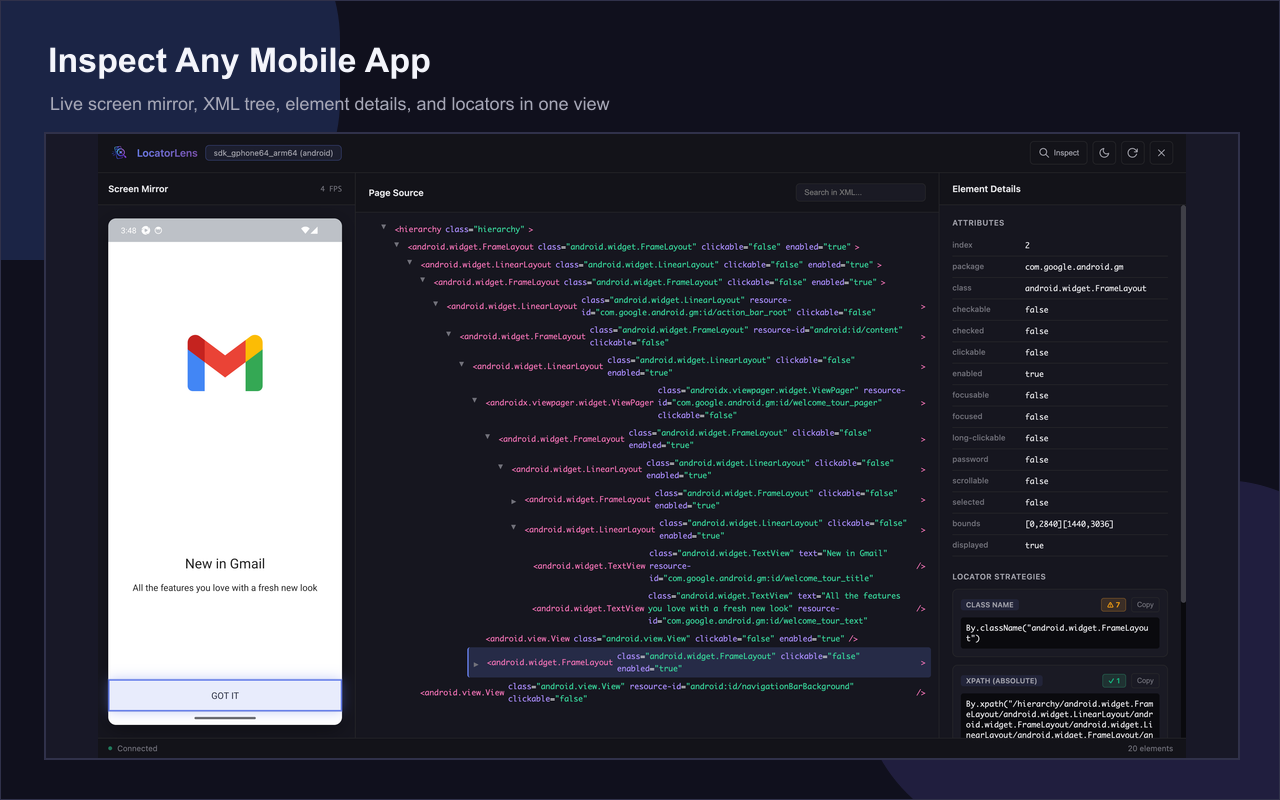
Live screen mirror
Stream your device screen up to 30 FPS and click any element to inspect it instantly.
XML hierarchy browser
Hover any node in the tree to highlight it on screen. Search by attribute name or value.
Ranked locators + validation
Best locator shown first. Each one tagged as unique or multiple-match before you copy it.
Appium method preview
See getText(), getRect(), and isEnabled() values for any element before writing test code.
Interact + scroll mode
Tap elements or drag to scroll directly from the browser — no device in hand needed.
Built-in log viewer
Filterable Info, Warning, and Error logs — debug without leaving Chrome.
Why it feels faster
LocatorLens vs. traditional Appium Inspector workflows.
Workflow needLocatorLensTraditional inspector flow
Startup1 click from Chrome — no terminal requiredStart Appium manually, configure capabilities JSON
App switchingInspect any foreground app instantly — no reconnectionNew session and new capabilities required per app
Screen updatesLive mirror up to 30 FPS with auto-refresh on changeStatic snapshot — manual refresh required
Locator output10+ strategies together: XPath, IDs, UIAutomator2, Accessibility ID, Class Chain, NSPredicateUsually one strategy at a time
ValidationUnique or multiple-match badge per locatorVerify uniqueness manually in code
Interact modeTap and scroll from the browser, no device in handSeparate panel, limited gestures
Setup
Built as a local-first Chrome extension workflow.
Install prerequisites
Node.js 18+, Appium 2.x, and the UIAutomator2 or XCUITest driver.
Load the extension
Add it to Chrome from the Web Store — one click, no manual loading.
Run auto setup
Download the installer from Settings and register the native companion in one step.
Start inspecting
Start servers, select a device, open any app, and click elements on the live mirror.
Node.js 18+
Appium 2.x
Local companion
Dark + light theme
Built for daily Appium work
Stop reconfiguring. Start inspecting.
Open the app, click the element, copy the locator. That's the whole loop.
Android, iOS Simulator, Windows, macOS, and Linux.
All automation stays local — nothing leaves your machine.